This post contains affiliate links: if you buy through them, SyncBricks may earn a commission at no extra cost to you. An ERP implementation process Australia should begin with a business-led scope, accountable owners and a testable plan, not a software configuration workshop. For a mid-sized business, the practical route is to agree priority processes, prepare only the data needed to run them, prove real scenarios with users, and make a controlled cutover. That approach protects day-to-day operations while giving finance, operations and IT clear decisions to make.
An ERP project is rarely difficult because people cannot select screens or load a spreadsheet. It becomes difficult when different teams expect the new system to preserve every legacy workaround, data ownership is unclear, or testing is left until the final week. The plan below is vendor-neutral. It applies whether you are moving from disconnected accounting, inventory and spreadsheet processes or replacing an older ERP.
What should be decided before an ERP project starts?
Start by describing the business outcome, not a module list. A distributor might need reliable stock and purchasing visibility. A professional services firm may need clearer project-to-invoice hand-offs. Finance may need timely, reconcilable information without manual exports. Each is a useful outcome because a team can test whether the new process achieves it.
Microsoft's implementation guidance groups the work into five stages: Strategize, Initiate, Implement, Prepare and Operate. The names are less important than the discipline: make key decisions before configuration begins, and keep responsibility alive after launch.
Create a short project charter that states:
- the business problems being addressed and the priority processes;
- what is in the first release and what is deliberately deferred;
- the executive sponsor, project lead and process owner for each area;
- the decisions that require finance, operations, IT or vendor input;
- the systems, integrations and data sets affected; and
- the acceptance evidence required before go-live.
The executive sponsor removes blockers and resolves trade-offs. Process owners decide how work should operate. IT owns technical readiness, access and integration responsibilities. An implementation partner should provide delivery expertise and document assumptions, but the business should not outsource decisions about its own approval rules, product data or customer service process.
Use the same discipline when assessing a product and partner. Our guide to ERP pricing comparisons for Australian businesses explains why licences, migration, integrations, training and support need to sit in the same scope sheet.
What does the ERP implementation process in Australia look like?
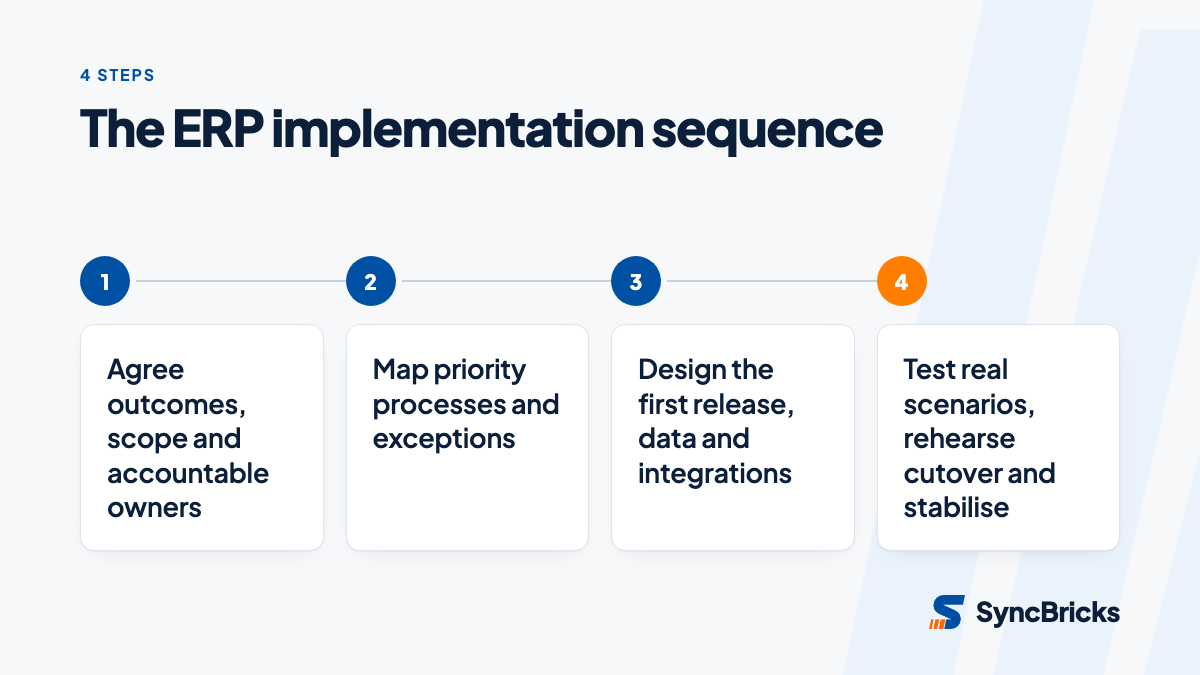
A mid-sized business can use seven practical stages. Some vendors use different terminology, and the stages will overlap, but each output should be visible and owned.
| Stage | Main business decision | Evidence to complete it |
|---|---|---|
| 1. Discover | What problem and processes does phase one solve? | Approved charter, scope and owners |
| 2. Map | How should priority work flow in the new system? | Process maps, exceptions and approved requirements |
| 3. Design | What will use standard configuration, integration or custom work? | Solution design and responsibility register |
| 4. Prepare data | What moves, archives or remains accessible? | Data inventory, mapping and reconciliation rules |
| 5. Build and test | Do end-to-end scenarios work for real roles? | Test cases, results and defect decisions |
| 6. Cut over | How will work and final data move safely? | Timed runbook, approvals and contingency actions |
| 7. Stabilise | How will issues, improvement and ownership continue? | Support route, handover and review schedule |
1. Discover and map the work before configuring
Run workshops around a small set of high-value journeys: quote to cash, procure to pay, stock receipt to fulfilment, or project delivery to invoice. Include the awkward cases, not only the happy path: a partial delivery, an approval rejection, a credit, a stock discrepancy or a corrected invoice.
For every journey, record the trigger, people involved, data created, approval point, exception and desired output. This exposes duplicated entry and unclear hand-offs early. It also provides the scenarios users will later test.
Where a current process exists only because the old system is awkward, challenge it. A new ERP is an opportunity to standardise work. It is not a reason to recreate every spreadsheet and manual exception in a newer interface. For help turning workshops into a delivery-ready scope, see our business process mapping service.
2. Design the minimum viable first release
Sort requirements into three groups: essential for day-one operations, valuable but safe to defer, and no longer justified. A first release should contain the processes that let the business trade, buy, fulfil, account and report safely. It should not become a promise to solve every reporting request or historical oddity.
Document whether each requirement will be met by standard configuration, an integration, changed process, or additional build. That distinction prevents a common surprise: an item assumed to be included turns out to need design and approval later.
This is also the time to assign system roles and access. The OAIC defines personal information as information or an opinion about an identified or reasonably identifiable individual. If the ERP holds employee, customer or supplier contact data, decide who needs access, who approves changes and how access will be reviewed. Keep privacy and operational control in the design discussion rather than treating them as a last-minute technical check.
How should a business prepare ERP data and integrations?
Data migration is not an export task. It is a business decision about what must be reliable in the new system on the first working day. Begin with an inventory covering customers, suppliers, items, chart of accounts, tax settings, warehouses, price lists, opening balances and open transactions. Then nominate a business owner for each data domain.
The ATO says businesses are legally required to keep records relating to tax, superannuation and registration affairs. It also says a business needs to be able to reconstruct original data when its record-keeping system changes, and that most records need to be kept for five years. That does not mean every historic record must be loaded into the new ERP. It does mean the project needs an intentional access and reconstruction plan.
Use a data decision table before loading anything:
| Data set | Day-one choice | Owner | Test question |
|---|---|---|---|
| Active customers and suppliers | Clean and migrate | Finance or operations | Can users create and process a transaction? |
| Products, services and stock | Clean and migrate | Operations | Do units, locations and values behave as expected? |
| Open invoices and orders | Migrate and reconcile | Finance | Do totals agree to the approved source? |
| Historic transactions | Archive or migrate by agreed need | Finance | Can staff retrieve records when required? |
| Old attachments and inactive records | Retain outside the live ERP where appropriate | Records owner | Is access documented and controlled? |
Clean the selected records before mapping them. Resolve duplicates, inconsistent naming, retired items and missing mandatory fields. Then run a sample load into a test environment and have business users check the outcome. A successful import is not enough if the resulting orders, reports or approvals do not work.
List every integration with its source, destination, data direction, frequency, failure alert and business owner. For example, an ecommerce order feed may technically arrive, yet still create errors if product identifiers, tax rules or fulfilment statuses do not align. Our ERP integration service can help define these connections and the responsibility for testing them.
How do you test, train and cut over without avoidable disruption?
Testing should prove the process, not just confirm that individual fields accept values. Reuse the journeys agreed in discovery and assign users who perform those jobs in real life. Ask them to execute the normal route and the exceptions, then record the expected result, actual result, defect owner and decision.
A useful test sequence is:
- Configuration checks: Confirm roles, settings and foundational data behave as designed.
- Integration and data tests: Confirm data moves accurately between connected systems and reconciles where needed.
- End-to-end scenario tests: Have business users complete real workflows from trigger to financial or operational result.
- User acceptance testing: Process owners decide whether priority scenarios meet the agreed acceptance criteria.
- Cutover rehearsal: Practise the final extracts, load, reconciliation, access changes and communications using a timed runbook.
Training should be role-based and close enough to launch that people can use what they learn. A warehouse user, accounts payable approver and finance manager need different practice. Give each role a clear starting point, the common tasks it owns, the escalation route and any temporary workaround approved for launch.
The cutover runbook should state who does each task, its start and finish condition, the decision point, and the contingency action if a critical check fails. Include final data extracts, user access, integration activation, reconciliations, communication to affected staff and the owner who can approve proceeding. Do not describe a go-live as complete merely because the system is accessible.
If your team wants technical context for an ERPNext implementation, this ERPNext installation, configuration and integration course on Udemy is a separate training resource. It is not a substitute for agreeing your business process, data responsibilities and acceptance criteria.
What should stay in phase one and what should wait?
Phase one should earn trust by making the essential work dependable. Defer an item when it does not prevent compliant trading, core reporting or customer service, and when the business can operate safely without it for a defined period. Deferral is a decision with an owner and review date, not a forgotten requirement.
Common risks and practical responses include:
- Uncontrolled scope: maintain a change register that explains the value, impact and approver for every addition.
- Unreliable data: make business owners sign off on cleansing and reconciliation rules before final load.
- Hidden integration work: test the full process across systems, including errors and retries.
- Low adoption: involve actual users in design and testing, then train by role.
- No post-launch ownership: name a support route, decision makers and an early review schedule before go-live.
After launch, move from project activity to operational ownership. Keep a short period of focused support, then review defects, backlog items, user feedback and controls. Microsoft describes an operate stage in its implementation framework for a reason: the value of an ERP comes from reliable use and deliberate improvement after deployment, not from the launch date alone.
Get a practical ERP implementation plan
An ERP implementation is more manageable when the business can point to an agreed scope, owned data, tested scenarios and a rehearsed cutover. SyncBricks helps Australian mid-sized businesses translate operating requirements into a practical design, implementation and handover plan. Talk to SyncBricks about ERP implementation when you are ready to turn your shortlist or chosen platform into a controlled project.