Managed IT services Australia buyers should select a provider by comparing written responsibilities, not a headline monthly fee. For a small or mid-sized business, the agreement should make clear who supports staff, maintains devices, manages access, checks backup and recovery, handles security tasks and owns the records needed for a safe handover. If a responsibility is not written down, assume it needs a direct question before signing.
What should managed IT services Australia include?
Managed IT is an operating arrangement, not simply a technician on call. The provider takes responsibility for an agreed set of recurring tasks while the business retains decisions about risk, priorities, budgets and access. This differs from break-fix support, where work begins only after something fails.
The service should begin with a shared understanding of your environment: staff, locations, devices, line-of-business applications, cloud accounts, connectivity and important suppliers. Then it should make responsibilities visible.
| Area | What the agreement should identify | Buyer question |
|---|---|---|
| User support | Contact channels, hours, priority definitions and escalation | How are urgent issues handled outside normal support hours? |
| Devices and software | Managed devices, operating systems, applications and update process | What happens when an update affects a critical business system? |
| Identity and access | Joiner, mover and leaver process; privileged access controls | Who can approve access and how is it reviewed? |
| Backup and recovery | Covered data, responsibilities, recovery process and testing | How do we know a restoration will work when it is needed? |
| Security | Agreed controls, monitoring, incident contacts and reporting | Which security tasks are included, optional or excluded? |
| Documentation | Asset list, account records and operating documentation | What can the business access at any time? |
The list will be different for a distributed professional-services firm, a warehouse or a multi-site operation. The test is whether the proposal reflects the business you actually run, rather than a generic bundle of tools.
Which services belong in the standard scope?
There is no universal standard package, so avoid buying on assumptions. A credible provider should explain exactly what it does as routine work and which projects or specialist systems fall outside the recurring arrangement.
For many businesses, the core discussion covers help desk support, routine maintenance, access administration, monitoring, backup responsibilities, onboarding and offboarding, and a regular review of risks and planned changes. The important point is not that every item must be included. It is that each item has an owner.
The Australian Cyber Security Centre describes the Essential Eight as a framework of eight strategies that work together to help organisations reduce cyber risk. It is useful as a provider-selection prompt. Ask how the proposed service contributes to the agreed controls, what remains the business’s responsibility and what evidence you will receive. A provider should not imply that a subscription alone makes an organisation compliant with any framework.
This is also why reactive support is rarely enough for a business that depends on its systems daily. The preventive tasks between incidents, such as update management, access reviews and recovery checks, need an agreed cadence. Our guide to MSP services in Australia explains the service model in more detail.
How do you compare managed IT providers?
Start by giving finalists the same brief. Include locations, staff, devices, important applications, connectivity, current pain points and upcoming changes. A common brief exposes where proposals differ in assumptions rather than disguising the difference behind different pricing structures.
Use this buyer checklist in each meeting:
- Ask for inclusions and exclusions in writing. “Proactive” and “fully managed” need a list of activities, frequency and limits.
- Check the support and escalation model. Request priority definitions, operating hours, the process for an unresolved issue and who owns communication during a disruption.
- Test the onboarding plan. A provider cannot responsibly take ownership without an initial discovery process, asset inventory and account review.
- Ask how security work is evidenced. Reports should make completed work, gaps and decisions visible rather than just list software installed.
- Confirm account and documentation ownership. The business needs clarity on its domain, cloud tenancy, licences, administrator access and technical records.
- Separate routine work from projects. Ask how an office move, cloud migration, hardware refresh or specialist application issue would be scoped and approved.
- Read the exit provisions. Confirm the handover process, access to records and expected assistance if the provider relationship changes.
A recent ABC report on a Queensland government department’s cyber incident described how the entity took containment and investigation steps and strengthened controls afterwards. The scale and setting are not directly comparable to a small business, but the buyer lesson is: responsibility for third-party access and controls cannot be left vague. Ask a provider how it protects its own administrative access to your systems and how it would support your response if something goes wrong.
For a local view of the decision, see what small businesses should expect from IT support. The principle applies Australia-wide: a good provider should be specific about the work it performs and the decisions it escalates.
What should be charged separately?
Routine operations and change work are not the same thing. Hardware purchases, software licences, major migrations, new office connectivity, large remediation projects and support for specialist applications are often separate items. That can be reasonable, provided the boundary is clear before the relationship begins.
Ask for concrete examples. If a new employee starts, what is included? If an employee leaves, what is included? If Microsoft 365 access is lost, who coordinates recovery? If the business moves office, what work requires a separate proposal? Written examples are more useful than broad assurances.
A business should also avoid confusing the provider’s tools with the provider’s accountability. Tools can monitor a device or create an alert. The service value is the agreed response: who assesses it, who contacts the business, who makes a change and how that change is documented.
How do you run a low-risk provider selection?
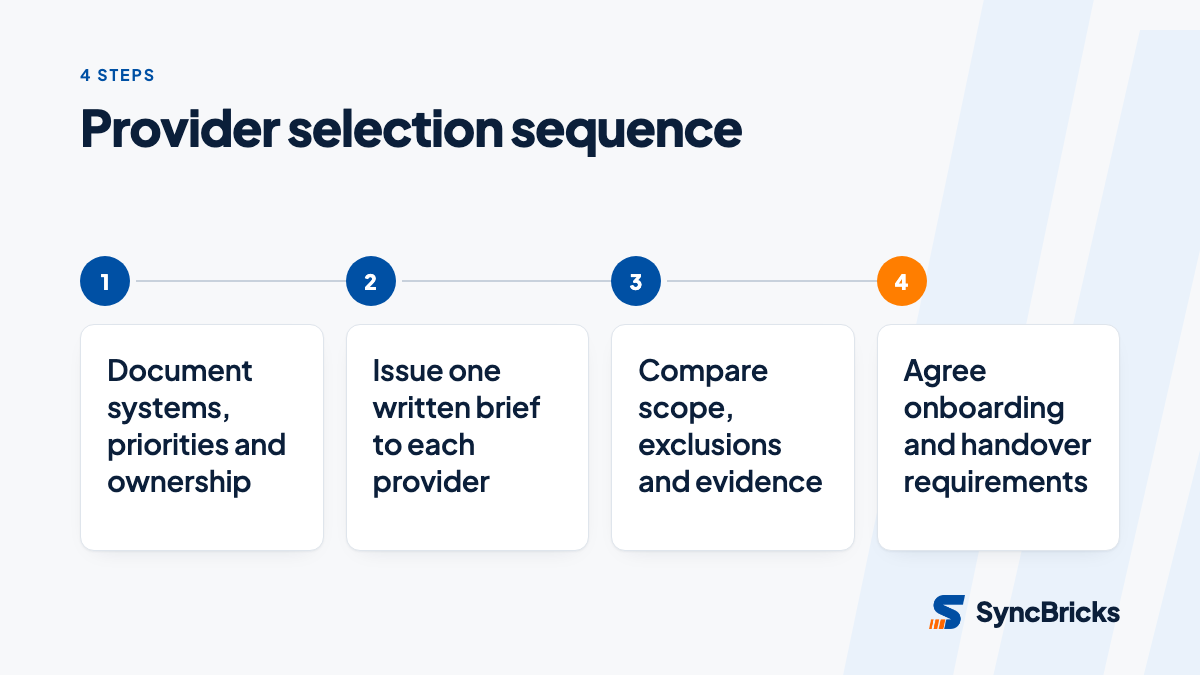
Selection is safer when it is staged. First document your environment and non-negotiables. Then use the same brief with each provider. Finally, ensure the successful provider has an onboarding period that validates the inventory, access arrangements and priority risks before it is measured against ongoing service expectations.
The managed provider should bring operational capability. Your business still needs a named decision maker who can approve access, communicate new starters and leavers, prioritise risk and read service reports. Outsourcing tasks does not outsource accountability.
The right arrangement gives a small or mid-sized business a visible operating rhythm: issues are logged, preventive work has an owner, security responsibilities are understood and changing providers does not mean losing control of critical accounts. That is a more durable buying criterion than any promise of unlimited support.
If you want to turn this checklist into a scope for your own environment, SyncBricks’ managed IT services team can help identify the operational responsibilities, security priorities and documentation needed before you choose a provider.
Sources
- Essential Eight, Australian Cyber Security Centre
- Queensland government department loses $800k in cyber attack, ABC News
- Managed IT support for small business: what to expect from a provider, Comingwave