For a small business, IT support Melbourne should mean more than someone to call when a laptop stops working. Expect a written service scope covering everyday help, the systems the provider manages, security and backup responsibilities, clear escalation arrangements, and a plan for keeping ownership of your accounts and documentation. The best provider is not necessarily the one with the shortest proposal. It is the one that can explain, in writing, what it will do, what your team must do and how both sides will know the service is working.
What should IT support Melbourne include for a small business?
IT problems rarely arrive one at a time. A new employee may need an account, a software update may affect a business application, and an unexpected email may need checking before someone opens it. If support is only a phone number for emergencies, the business is still left to coordinate maintenance, access and security work between incidents.
A useful IT support arrangement begins with an inventory of the business environment: people, devices, business applications, internet connection, cloud accounts and important suppliers. It then turns that inventory into a service scope. That is how an owner can see whether two proposals are really comparable.
| Area | What to expect in the written scope | Question to ask |
|---|---|---|
| User support | How staff request help, the supported hours, priority definitions and escalation path | Which issues are included and which are treated as project work? |
| Devices and software | The devices, operating systems and applications covered, plus update responsibilities | Who approves changes that could affect our business software? |
| Identity and access | How accounts are created, changed and removed, and who authorises access | Who has administrator access and how is it reviewed? |
| Backup and recovery | What information is backed up, where responsibilities start and end, and how restoration is handled | How do we verify that the data we need can be recovered? |
| Security operations | The agreed controls, monitoring or review activities, and incident contacts | Which security tasks are included, and what evidence will we receive? |
| Vendor coordination | Which third parties the provider will deal with, and who owns the commercial relationship | Will you help us coordinate with our software, internet and phone providers? |
| Planning and reporting | The meetings, documentation and reports included | What decisions or risks will you bring to our attention? |
The exact scope will vary. A professional services firm using cloud applications has different needs from a warehouse with shared devices and operational software. The point is not to buy every available service. It is to make the required outcome visible before agreeing to a fee or term.
For a broader view of the service model, read our guide to MSP services in Australia. A local provider should still take the time to understand your actual environment rather than applying a generic checklist without discussion.
Why is reactive IT support not enough on its own?
Break-fix support is simple to understand: something fails, the business requests help and pays for work performed. It can be appropriate for a one-off issue or a business with a capable internal person who already manages its technology. Its limitation is that routine work can become nobody's named responsibility.
A current Melbourne competitor's pricing guide contrasts subscription support with break-fix support and highlights the need to review the service-level agreement, the business's support needs, provider expertise and documentation. Those are useful buying prompts, not universal guarantees. A subscription only creates value when the scope is specific and the provider actually performs the preventive work it promises.
The risk is not simply an inconvenient outage. It is uncertainty about who is meant to maintain devices, remove access when staff leave, coordinate a vendor issue or check that important information can be recovered. The Australian Government's October 2026 small-business guidance recommends updating software and devices, enabling multi-factor authentication, reviewing access, backing up important data and training staff to recognise scams. Each of those activities needs an owner.
Ask a prospective provider to map those responsibilities. If it says a task is shared, ask what the provider does, what the business does, when it happens and how completion is recorded. “Shared responsibility” without that detail can become a gap at the worst time.
How should a provider support cyber security and continuity?
A support provider cannot remove all technology risk, and no responsible provider should imply that it can. What it can do is help the business decide on controls, operate the agreed tasks and report on gaps that require an owner decision.
The Australian Cyber Security Centre describes the Essential Eight as a framework of eight strategies that work together to reduce cyber security risk. It is a practical conversation starter for a small business and its IT provider. It helps shift the discussion from a vague request for “better security” to questions about the systems, access, updates and recovery measures that matter.
Use the following checklist during provider selection:
- Ask how the provider will document your current devices, applications, accounts and key suppliers.
- Ask what it will do to support timely software and device updates, and what approvals it needs from your business.
- Confirm how multi-factor authentication will be enabled and what happens when a staff member loses a device or changes role.
- Identify who can grant privileged access and how that access is reviewed.
- Ask what important data needs backup, how a recovery request is initiated and who approves it.
- Agree on incident contacts, decision makers and how the provider will communicate during a disruption.
- Request a plain-English list of security work that is included, optional or excluded.
The goal is not to make a small business run an enterprise security program. It is to have a sensible, visible set of responsibilities. Our Essential Eight guide can help leadership teams frame the initial discussion, while a managed IT partner can translate agreed priorities into day-to-day operations.
What should you check before signing an IT support agreement?
A polished proposal is not the same thing as an operating agreement. Before signing, give finalists the same short written brief and ask them to respond against it. Include staff locations, devices, core applications, office connectivity, current pain points and the responsibilities you expect them to take on.
Then read the service agreement with the same care as the sales material. Look for defined terms, not general promises. “Proactive support” should lead to a description of activities, cadence and reporting. “Security included” should identify the controls and the division of responsibilities.
| Check | Why it matters | Evidence to request |
|---|---|---|
| Inclusions and exclusions | Prevents a recurring fee from being mistaken for unlimited work | Service catalogue and exclusions list |
| Priorities and escalation | Sets expectations when an issue affects operations | Priority definitions and named escalation path |
| Onboarding | Establishes the baseline before the provider takes responsibility | Discovery plan, asset inventory and handover tasks |
| Documentation | Makes the environment understandable and transferable | List of documents the business will receive or can access |
| Account ownership | Protects continuity when people or providers change | Record of domain, licence, cloud and administrator ownership |
| Change process | Separates routine support from work that needs a scope and approval | Process for quoting, approving and recording changes |
| Offboarding | Avoids a rushed handover if the relationship ends | Exit support, credential handover and data-access process |
Be particularly careful with ownership. The company should understand who controls its domain, cloud tenancy, software subscriptions, administrator accounts and technical records. A provider may administer these systems, but the commercial and access arrangements should be transparent. This makes change easier for both parties and reduces reliance on a single individual.
If a proposal includes a fixed monthly arrangement, do not assume this means every request is included. Ask for examples of normal user support, onboarding, major changes and supplier coordination, then ask how each would be handled. Clear boundaries are healthier than a vague promise of unlimited support.
How can a Melbourne business choose the right provider?
Start with the job to be done. Perhaps staff are losing time to recurring issues, the business has no clear owner for Microsoft 365 administration, or an office move has exposed network weaknesses. Describe the outcome in business terms, then test whether a provider can turn it into a sensible scope.
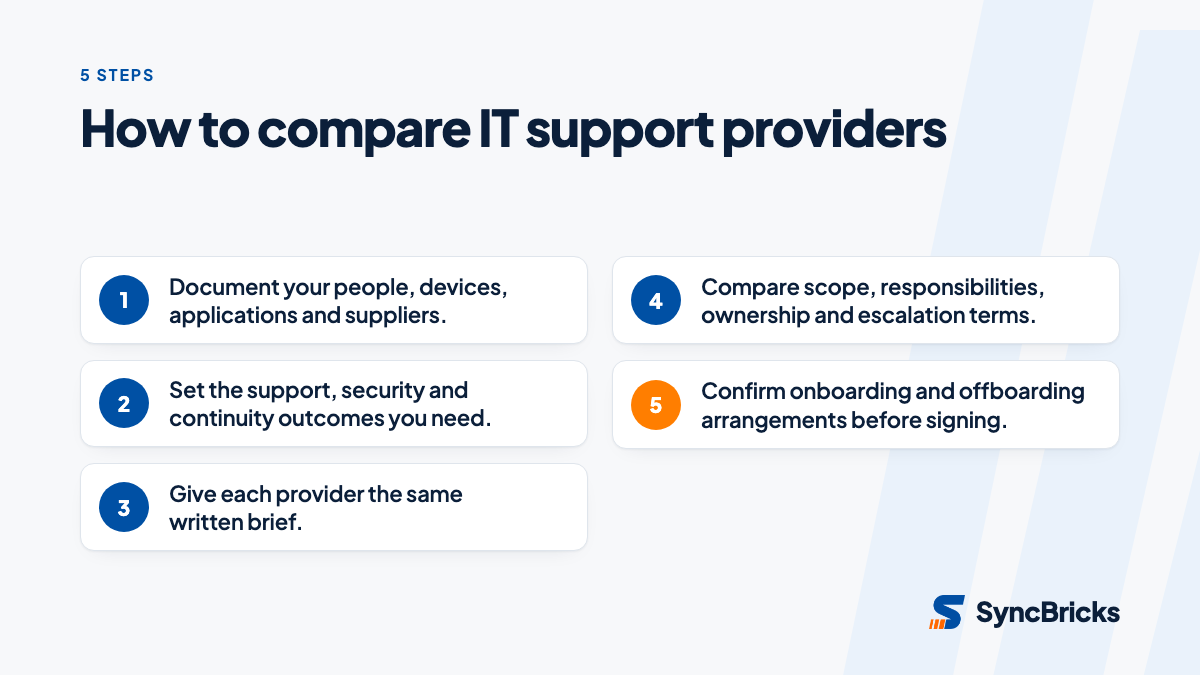
A practical selection process is:
- Document your starting point. List locations, staff, devices, business applications, cloud accounts and suppliers. Note recurring issues and upcoming changes.
- Set the non-negotiables. Decide what must be covered, such as support for a critical application, an access process for joiners and leavers, or a documented backup responsibility.
- Use one brief for all providers. This makes differences in scope, assumptions and exclusions easier to see.
- Meet the delivery team. Ask who will understand your environment after sales handover and how knowledge is retained.
- Test a realistic scenario. Ask how the provider would handle a departed employee, a suspected phishing email or loss of access to a key business system.
- Check the handover provisions. Confirm your business can access its records and accounts if circumstances change.
There is room for different models. A small business with an experienced internal technology lead may want targeted specialist assistance. A growing firm without that capability may prefer ongoing coordination and a defined support rhythm. What matters is selecting the model that matches your internal capacity, not buying a label.
For comparison context, see our explanation of in-house IT versus managed services. It outlines the decision as a question of responsibilities and operating needs, rather than a simple choice between an employee and an external provider.
When is it time to talk to a managed IT provider?
It is time to start the conversation when technology responsibilities are unclear, recurring problems interrupt staff, or an upcoming change needs coordinated planning. You do not need to wait for a major incident. A good first conversation should help you define the environment, priorities and responsibilities before it becomes a sales exercise.
SyncBricks works with Australian businesses that need a practical approach to ongoing technology operations. Explore our managed IT services to discuss your Melbourne environment, the responsibilities you want covered and the documentation needed for a clear support arrangement.